Cockpit Documentation
Usage DevelopmentExternal Integrations
#Informing Cockpit of Features
External applications and services can share a variety of integration features with Cockpit using a HTTP server.
It should include a register_service JSON endpoint, with a path to a Cockpit-focused JSON endpoint, e.g.
/register_service
{
   ...
   "extras":{
      "cockpit":"/cockpit_extras.json"
   }
}
This is often relevant for BlueOS Extensions that need active interaction while the vehicle is being operated, but can also be provided by programs on the Cockpit host computer, or via the internet (for operating conditions where that is viable).
The following functionalities can be added by configuring the cockpit_extras.json file:
- Integrating custom iframe widgets
- Adding custom Actions
- Automatically suggesting joystick mappings
Keys for the cockpit_extras.json file are typed in lowerCamelCase. We recommend to type id values in kebab-case.
{
   "myKey": "Blue Boat",
   "myId": "blue-boat"
}#Minimal configuration
A minimal cockpit_extras.json file can be seen below. This file does not add any extra functionality yet.
| Attribute | Type | Required | Note |
|---|---|---|---|
targetCockpitApiVersion | string | yes | |
targetSystem | string | yes | |
widgets | array | yes | An array containing iframe widget configuration objects |
actions | array | yes | An array containing action configuration objects |
joystickSuggestions | array | no | An array containing joystick mapping suggestion group objects |
cockpit_extras.json |
{
   "targetSystem":"Cockpit",
   "targetCockpitApiVersion":"1.0.0",
   "widgets": [],
   "actions": [],
}#iframe Widget configuration
You can add iframe widgets to Cockpit based on your BlueOS Extension by adding a widget configuration.
| Attribute | Type | Required | Note |
|---|---|---|---|
name | string | yes | |
iframeUrl | string | yes | |
iconUrl | string | partial | Either iconUrl or iframeIcon must be set |
iframeIcon | string | partial | Either iconUrl or iframeIcon must be set |
collapsibleContainerName | string | no | |
version | string | no | |
startCollapsed | boolean | no | |
useExtensionPathAsBaseUrl | boolean | no |
cockpit_extras.json
{
   ...
   "widgets":[
      {
         "name":"ExternalWidgetName",
         "iframeUrl":"/path/to/widget/page",
         "iconUrl":"/path/to/widget/icon.png",
         "iframeIcon":"/path/to/iframe/icon.png",
         "collapsibleContainerName": "ContainerName",
         "version":"1.3.8",
         "startCollapsed": true,
         "useExtensionPathAsBaseUrl": true
      }
   ]
}#Cockpit Action configuration
You can add Cockpit Actions based on your BlueOS Extension by adding an action configuration. This will make the Actions available in Cockpit.
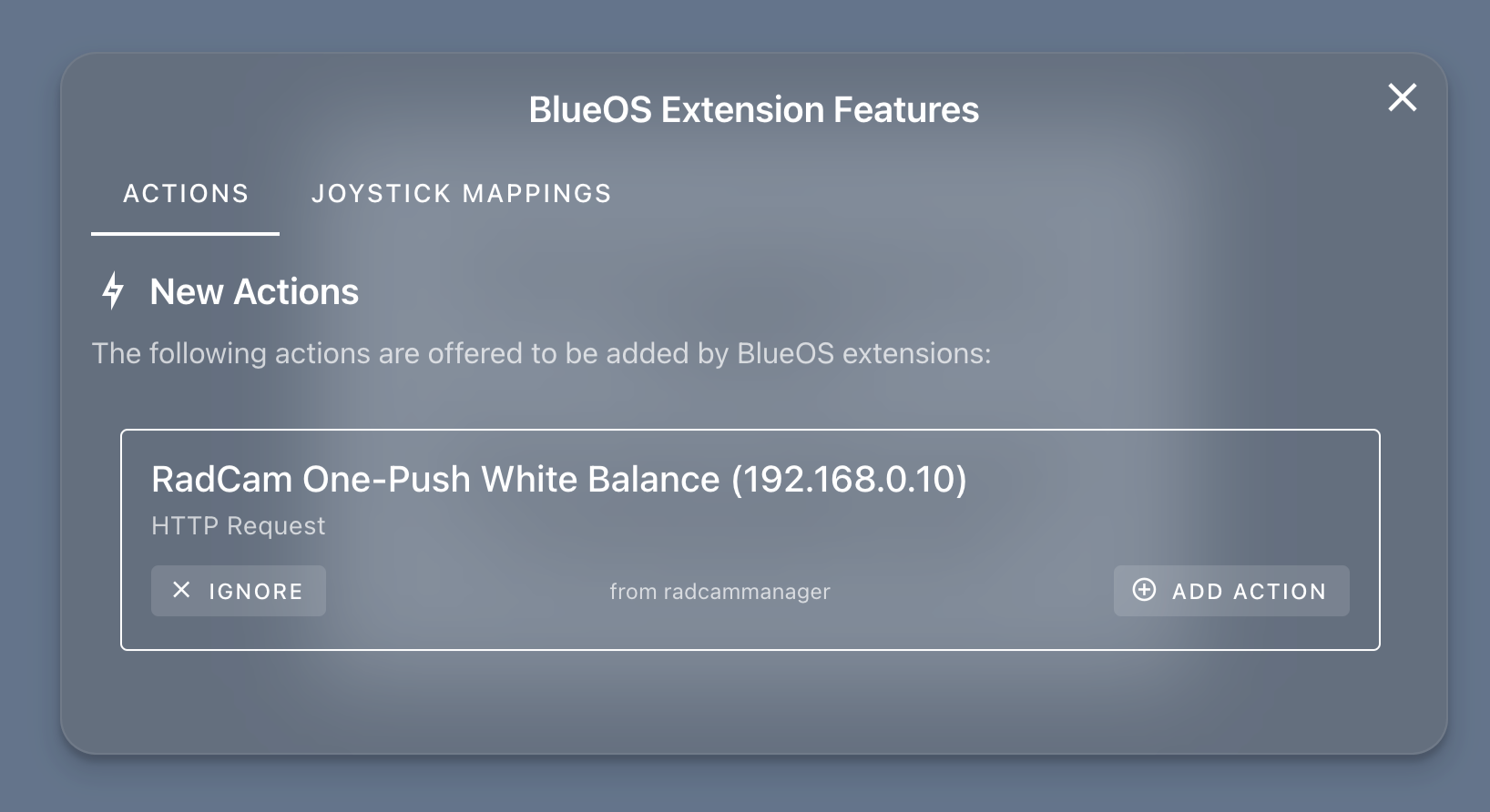
The action configuration follows a structure as seen below with some differences for each type of action.
| Attribute | Type | Required | Note |
|---|---|---|---|
id | string | yes | |
name | string | yes | |
type | string | yes | Allowed types: "mavlink-message", "http-request", "javascript" |
config | object | yes | A MAVLink, HTTP or JavaScript action configuration |
version | string | no |
cockpit_extras.json
{
   ...
   "actions": [
      {
         "id": "unique-action-id",
         "name": "ActionName",
         ...
         "version": "1.0.0"
      }
   ]
}#MAVLink Message Action configuration
| Attribute | Type | Required | Note |
|---|---|---|---|
name | string | yes | |
messageType | string | yes | Allowed types |
messageConfig | any | yes |
cockpit_extras.json
{
   ...
   "actions": [
      {
         "id": "unique-action-id",
         "name": "ActionName",
         "type": "mavlink-message",
         "config": {
            "name": "ActionName",
            "messageType": "MAV_TYPE_CAMERA",
            "messageConfig": null
         },
         "version": "1.0.0"
      }
   ]
}#HTTP Request Action configuration
| Attribute | Type | Required | Note |
|---|---|---|---|
name | string | yes | |
url | string | yes | You can use the {{ vehicle-address }} parameter to automatically load the correct address |
method | string | yes | Allowed methods: "GET", "POST", "PUT", "DELETE", "PATCH" |
headers | object | yes | |
urlParams | object | yes | |
body | string | yes | Make sure to escape your quotes |
cockpit_extras.json
{
   ...
   "actions": [
      {
         "id": "unique-action-id",
         "name": "ActionName",
         "type": "http-request",
         "config": {
            "name": "ActionName",
            "url": "http://{{ vehicle-address }}/extensionv2/myextension/api/speed",
            "method": "POST",
            "headers": {
               "Content-Type": "application/json"
            },
            "urlParams": {},
            "body": "{\"speed\":10}",
         },
         "version": "1.0.0"
      }
   ]
}#JavaScript Action configuration
| Attribute | Type | Required | Note |
|---|---|---|---|
name | string | yes | |
code | string | yes | Make sure to escape your quotes |
cockpit_extras.json
{
   ...
   "actions": [
      {
         "id": "unique-action-id",
         "name": "ActionName",
         "type": "javascript",
         "config": {
            "name": "ActionName",
            "code": "console.log(\"Something useful!\")"
         },
         "version": "1.0.0"
      }
   ]
}#Joystick Mapping Suggestion configuration
BlueOS extensions can suggest joystick button mappings to the user.
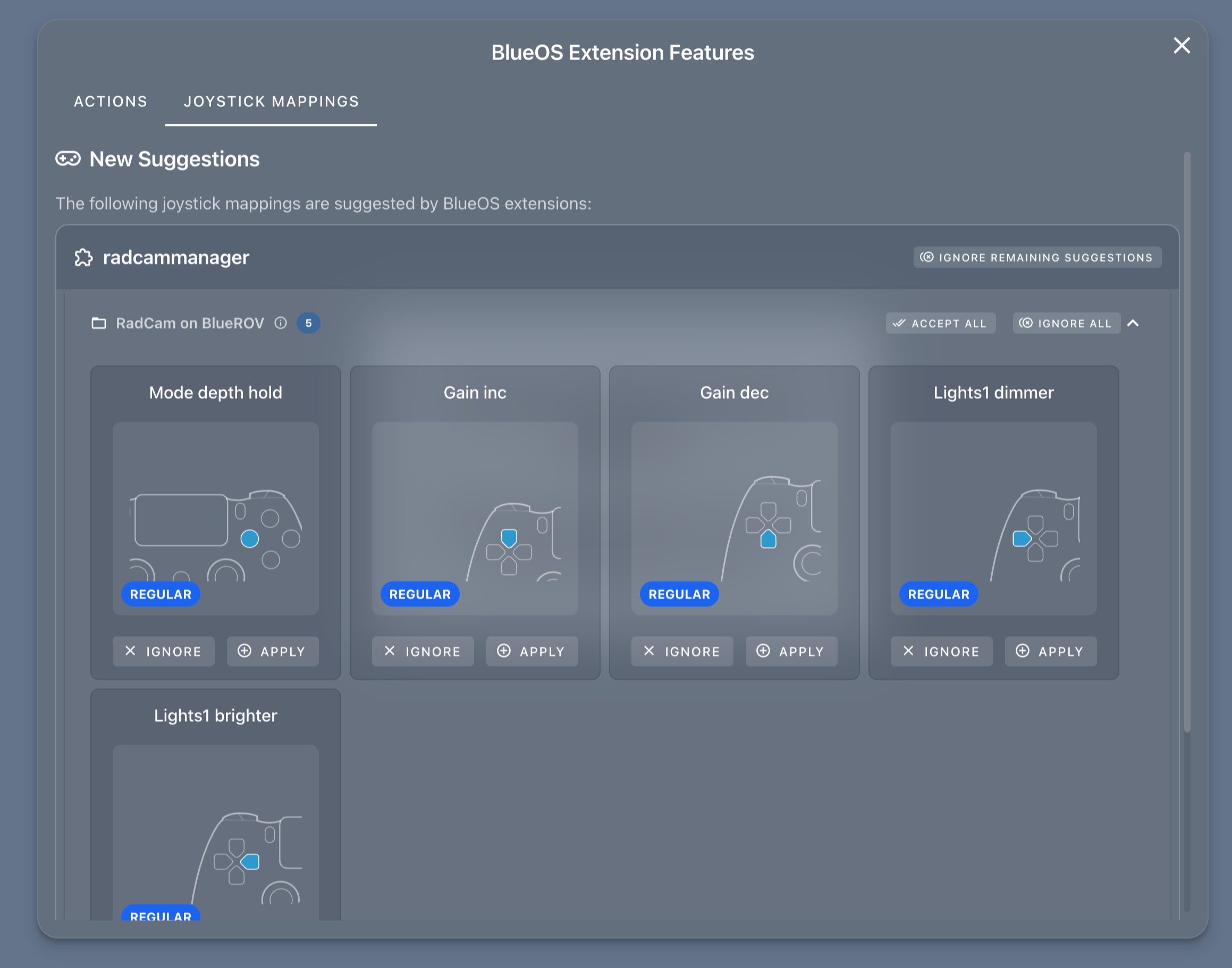
When suggestions are available, a modal pops up showing them organized by extension and by group. Users can apply suggestions one by one or all at once, and can also ignore suggestions they don't want.
Each joystick profile tracks its own set of applied and ignored suggestions independently.
#Joystick Mapping Suggestion Group
Joystick Mapping Suggestions must be contained in a Joystick Mapping Suggestion Group. This allows you to suggest multiple mappings based on what hardware is connected for example.
| Attribute | Type | Required | Note |
|---|---|---|---|
id | string | yes | |
name | string | yes | |
description | string | no | |
buttonMappingSuggestions | array | yes | An array containing Joystick Mapping Suggestion Configuration objects |
targetVehicleTypes | array | no | |
version | string | no |
cockpit_extras.json
{
   ...
   "joystickSuggestions": [
      {
         "id": "my-useful-extension",
         "name": "My Descriptive Name",
         "description": "An informative description describing the suggestion group",
         "buttonMappingSuggestions": [
            ...
         ],
         "targetVehicleTypes": [
            "model-id-one",
            "model-id-two"
         ],
         "version": "0.0.0"
      }
   ]
}#Joystick Mapping Suggestion
| Attribute | Type | Required | Note |
|---|---|---|---|
id | string | yes | |
actionProtocol | string | yes | Allowed values: "cockpit-modifier-key", "mavlink-manual-control", "cockpit-action", "data-lake-variable", "other" |
actionName | string | yes | |
actionId | string | yes | |
button | number | yes | |
modifierKey | string | yes | Allowed values: "regular", "shift" |
description | string | no |
cockpit_extras.json
{
   ...
   "joystickSuggestions": [
      {
         "id": "my-useful-extension",
         "name": "My Descriptive Name",
         "description": "An informative description describing the suggestion group",
         "buttonMappingSuggestions": [
            {
               "id": "my-extension-id",
               "actionProtocol":"cockpit-action",
               "actionName":"Action name",
               "actionId": "my-custom-action-id",
               "button": 0,
               "modifierKey": "regular",
               "description": "A clear description of your action",
            }
         ],
         "targetVehicleTypes": [
            ...
         ],
         "version": ""
      }
   ]
}#Complete cockpit_extras.json example
{
   "targetSystem":"Cockpit",
   "targetCockpitApiVersion":"1.0.0",
   "widgets": [
      {
         "name": "RadCam (192.168.2.191)",
         "iframeUrl": "/?cockpit_mode=true",
         "iframeIcon": "/assets/logo.svg",
         "version": "0.2.0-beta.10"
      }
   ],
   "actions": [
      {
         "id": "camera-focus-decrease",
         "name": "Radcam Camera Focus Decrease",
         "type": "http-request",
         "config": {
            "name": "Radcam Camera Focus Decrease",
            "method": "POST",
            "url": "http://{{ vehicle-address }}/extensionv2/radcam/focus",
            "headers": {
               "Content-Type": "application/json"
            },
            "urlParams": {},
            "body": "{\"action\":\"decrease\"}"
         }
      },
      {
         "id": "camera-focus-increase",
         "name": "Radcam Camera Focus Increase",
         "type": "http-request",
         "config": {
            "name": "Radcam Camera Focus Increase",
            "method": "POST",
            "url": "http://{{ vehicle-address }}/extensionv2/radcam/focus",
            "headers": {
               "Content-Type": "application/json"
            },
            "urlParams": {},
            "body": "{\"action\":\"increase\"}"
         }
      },
      {
         "id": "camera-zoom-decrease",
         "name": "Radcam Camera Zoom Decrease",
         "type": "http-request",
         "config": {
            "name": "Radcam Camera Zoom Decrease",
            "method": "POST",
            "url": "http://{{ vehicle-address }}/extensionv2/radcam/zoom",
            "headers": {
               "Content-Type": "application/json"
            },
            "urlParams": {},
            "body": "{\"action\":\"decrease\"}"
         }
      },
      {
         "id": "camera-zoom-increase",
         "name": "Radcam Camera Zoom Increase",
         "type": "http-request",
         "config": {
            "name": "Radcam Camera Zoom Increase",
            "method": "POST",
            "url": "http://{{ vehicle-address }}/extensionv2/radcam/zoom",
            "headers": {
               "Content-Type": "application/json"
            },
            "urlParams": {},
            "body": "{\"action\":\"increase\"}"
         }
      },
   ],
   "joystickSuggestions": [
      {
         "id": "radcam-basic",
         "name": "RadCam basic controls",
         "description": "These controls will allow you to perform basic camera operations",
         "buttonMappingSuggestions": [
            {
               "id": "mock-extension-joystick-focus-decrease",
               "actionProtocol": "cockpit-action",
               "actionId": "camera-focus-decrease",
               "actionName": "Camera Focus Decrease",
               "modifier": "regular",
               "button": 6,
               "description": "Decrease the focus of the camera",
            },
            {
               "id": "mock-extension-joystick-focus-increase",
               "actionProtocol": "cockpit-action",
               "actionId": "camera-focus-increase",
               "actionName": "Camera Focus Increase",
               "modifier": "regular",
               "button": 7,
               "description": "Increase the focus of the camera",
            },
            {
               "id": "mock-extension-joystick-zoom-decrease",
               "actionProtocol": "cockpit-action",
               "actionId": "camera-zoom-decrease",
               "actionName": "Camera Zoom Decrease",
               "modifier": "shift",
               "button": 6,
               "description": "Decrease the zoom of the camera",
            },
            {
               "id": "mock-extension-joystick-zoom-increase",
               "actionProtocol": "cockpit-action",
               "actionId": "camera-zoom-increase",
               "actionName": "Camera Zoom Increase",
               "modifier": "shift",
               "button": 7,
               "description": "Increase the zoom of the camera",
            }
         ]
      }
   ]
}
Powered by Zola and Bluetheme Documentation under CC BY-NC-SA 4.0


 Sponsored by Blue Robotics
Code under
AGPLv3
/
Cockpit Custom
Sponsored by Blue Robotics
Code under
AGPLv3
/
Cockpit Custom